Checkout & Payments
Voucher & promo widgets
On-site voucher display, promoted-product sliders
In one sentence
What it is
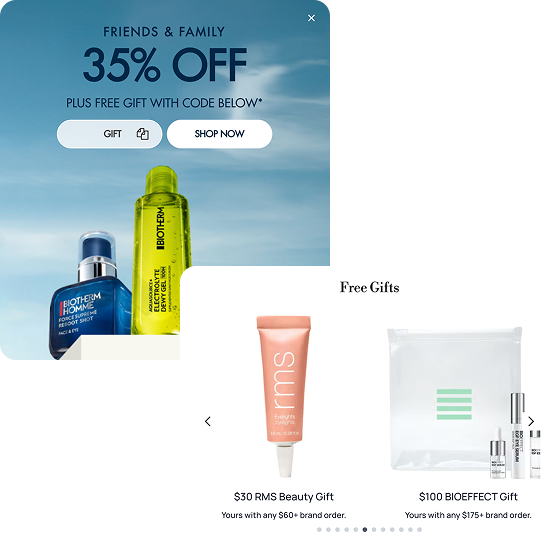
Voucher and promo widgets — on-site voucher display and promoted-product sliders — let a trading team surface active offers and promoted products directly on the storefront, built and scheduled through content tooling rather than a development request.
How it works
What it does
These widgets are placed on relevant pages — homepage, category pages, campaign landing pages — to display active voucher codes prominently, or to carousel through a curated set of promoted products the trading team wants to push. They're built from the same widget library used for other content, so a merchandiser assembles and schedules them like any other on-site content module, with the products and codes shown live and accurate to what's actually available. The brand controls exactly which offers and products appear, and when, without needing a release for each new campaign.
The problem it solves
Why it matters
For the brand
An active promotion that only lives in an email or a paid ad misses every shopper who arrives on-site through another channel — search, direct, organic. Without on-site widgets to surface the offer, trading teams either rely on shoppers already knowing about a promotion, or push developers for a bespoke banner build every time a campaign changes.
For their customers
Missing out on a live discount simply because it wasn't visible anywhere on the site they were already browsing is a common source of frustration, especially when they find out about it later from someone else.
For shoppers
How it benefits shoppers
- See active offers and voucher codes clearly on the site, without needing to have seen an email or ad first.
- Discover promoted products curated by the brand as a shortcut through a wide catalogue.
- Trust that a voucher shown on-site is genuinely active and correctly applied.
- Find relevant offers wherever they land on the site, not just on a dedicated offers page.
For the brand
How it benefits the brand
Surfaces promotions to every on-site visitor, not just those reached by email or paid media
Promotion redemption rate, on-site attach rate
Trading teams launch and schedule campaigns without a development request per change
Time to launch a promoted-product campaign
Promoted-product sliders drive attention to specific margin or clearance priorities
Click-through and conversion on promoted products
Consistent widget library keeps promotional content on-brand across every placement
Content consistency, launch quality
In practice
What it looks like
- 1
A trading team schedules a homepage voucher widget and a category-page promoted-product slider ahead of a seasonal campaign.
- 2
Both go live automatically on the scheduled date, without a development release.
- 3
A shopper browsing the homepage sees the active voucher code clearly displayed and copies it.
- 4
On a category page, they scroll through the promoted-product slider and add one of the featured items.
Where it lands hardest
Strong use cases by industry vertical
Health & nutrition
Useful for surfacing bundle and subscription offers directly on category pages where regimen-building happens.
Beauty & personal care
Well suited to promoting gift-with-purchase and seasonal campaigns visually, given the category's strong reliance on visual merchandising.
Food, drink & FMCG
Effective for surfacing multibuy and threshold offers at the point shoppers are building a larger replenishment basket.
Pet care
Useful for promoting bulk-buy offers on food and seasonal treat ranges.
Fashion & apparel
A strong fit given the category's promotion-heavy calendar and frequent markdown and code-driven campaigns.
Luxury & premium
Use with restraint — prominent voucher widgets can read as discount-driven in a way that sits oddly with a premium positioning; more discreet, curated promoted-product placement fits better.
Common questions & objections
What clients usually ask
Why the platform version wins
Because these widgets draw live from the same offers and product data used elsewhere in checkout, a promotion shown on-site is guaranteed to behave the way it's displayed — not a separate marketing banner that can drift out of step with what the basket actually applies.