Experience & Engagement
Session settings
Shopper switches currency / locale / country
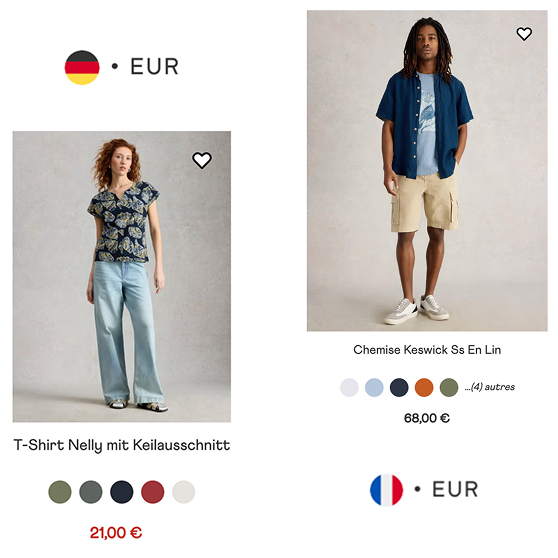
In one sentence
What it is
Session settings let a shopper switch currency, locale and country themselves, so an international visitor sees prices and language that match where they actually are rather than where the site assumes they are.
How it works
What it does
A selector, usually in the header, lets the shopper choose their currency, language and country, and that choice persists for the rest of the session (and typically across return visits via a stored preference). The brand controls which currencies, locales and countries are available, and can set sensible defaults based on the shopper's detected location so most people never need to touch the control at all. Everything downstream including product prices, promotions, delivery estimates and checkout, respects the chosen session settings, so there's no mismatch between what a shopper picks in the header and what they're charged at checkout.
The problem it solves
Why it matters
For the brand
International traffic is often the fastest-growing and most under-served segment on a site: the product is fine, but the site quietly tells the shopper they're not the intended customer by showing the wrong currency or language. Without self-serve session control, fixing this per market means separate builds or manual redirects that lag behind actual demand.
For their customers
Seeing prices in an unfamiliar currency, or a page in a language they don't read fluently, adds friction and doubt at exactly the point they're deciding whether to trust the site with a payment. Most shoppers won't dig through settings menus to fix this themselves, they'll just leave.
For shoppers
How it benefits shoppers
- See prices in their own currency immediately, with no mental conversion required to judge whether something is good value.
- Browse and check out in their preferred language, reducing the chance of a costly misunderstanding at checkout.
- Their choice sticks for the whole visit, no re-selecting currency on every page.
- A visible, obvious control rather than a buried settings page, so correcting a wrong default takes seconds.
For the brand
How it benefits the brand
Removes a silent barrier to converting international traffic
International conversion rate
Reduces basket abandonment caused by currency confusion
Checkout abandonment rate
One control serves every market without per-market development
Cost to support a new locale
Consistent pricing and language from browse through to payment
Support tickets related to pricing/checkout mismatches
In practice
What it looks like
- 1
A shopper from Germany lands on the site, which has detected their location and defaulted to EUR and German.
- 2
They open the header selector anyway and switch to English because they prefer to shop in it.
- 3
Every page they visit afterwards, product, basket, checkout, reflects EUR pricing and English copy.
- 4
They return a week later on a different device; the same preference is remembered from their account or stored session.
Where it lands hardest
Strong use cases by industry vertical
Health & nutrition
Cross-border demand for supplements is high; getting currency and language right at the first click matters for markets where trust in imported health products is already a hurdle.
Beauty & personal care
Global beauty brands rely heavily on international discovery via social. A wrong-currency landing page undoes the work of the ad that brought the shopper there.
Food, drink & FMCG
Relevant where a brand ships cross-border, though many FMCG brands are single-market by nature, which weakens the case here.
Pet care
Useful wherever pet brands expand into neighbouring markets, though the category is often more locally fulfilled than others, reducing the multi-currency need.
Fashion & apparel
A near-essential for fashion brands with global social reach, where a large share of traffic arrives from markets outside the home currency.
Luxury & premium
Getting this wrong is particularly damaging in luxury, where a clumsy currency experience undercuts the premium feel the rest of the site works to build.
Common questions & objections
What clients usually ask
Why the platform version wins
Rather than bolting on a currency-conversion widget that only changes the number displayed, session settings are read by pricing, promotions and checkout throughout the platform, so what the shopper sees is what they're actually charged.