Checkout & Payments
Multi-size order
Add several sizes of one product in one action
In one sentence
What it is
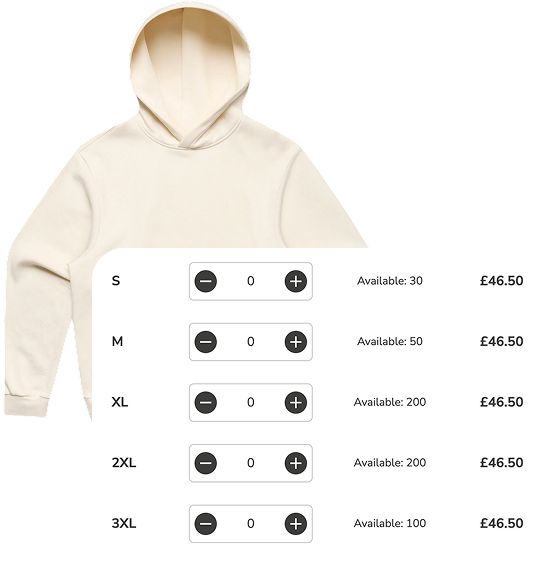
Multi-size order lets a shopper add several sizes of the same product to the basket in one action, so a parent buying three sizes of the same school shoe — or a shopper hedging between two fits — doesn't have to repeat the add-to-basket flow for each one.
How it works
What it does
On the product page, instead of choosing a single size and adding it, the shopper can select a quantity against multiple sizes at once — two of a medium, one of a large — and add them all to the basket together. It's most valuable for products genuinely bought in multiple sizes at once: multipacks, kidswear, or shoppers ordering a size either side of their usual fit to try before returning one. The brand controls which products show the multi-size control, since it only makes sense where buying several sizes together is a real behaviour.
The problem it solves
Why it matters
For the brand
When the only path to buying multiple sizes is repeating the whole add-to-basket flow per size, some shoppers give up after the first one and buy a single size — leaving revenue on the table in categories where multi-size buying is exactly the behaviour to encourage.
For their customers
Buying the same school shoe in two sizes for two children, or ordering a size up and a size down to keep whichever fits, means going through the product page and add-to-basket flow twice — a repetitive chore for something they already know they want.
For shoppers
How it benefits shoppers
- Add several sizes of the same item in one visit to the product page, not several.
- Hedge between two likely fits without the extra effort of a repeated add-to-basket flow.
- Buy for more than one person (children, gifts) from one product page.
- See all chosen sizes and quantities clearly before committing to the basket.
For the brand
How it benefits the brand
Removes friction from a proven multi-size buying behaviour
Units per basket, average order value
Captures size-hedging purchases that returns policy already anticipates
Basket size in size-hedging categories
Reduces repeated product-page visits within a single session
Conversion rate, session efficiency
Configurable per product, so it's only shown where relevant
Attach rate on eligible SKUs
In practice
What it looks like
- 1
A parent opens a school-shoe product page needing two different sizes for two children.
- 2
They set a quantity of one against each of the two sizes on the same page.
- 3
Both lines add to the basket together in a single action.
- 4
They check out once, with both sizes clearly itemised in the basket.
Where it lands hardest
Strong use cases by industry vertical
Health & nutrition
Weak fit — most nutrition products don't have a 'size' in the fit sense; more relevant to serving-size multipacks than true multi-size buying.
Beauty & personal care
Limited relevance, mostly for multi-size gifting or travel-versus-full-size buying rather than fit hedging.
Food, drink & FMCG
Useful for pack-size hedging (buying a small and large pack together) rather than fit, but the mechanic transfers cleanly.
Pet care
Good fit for households with pets of different sizes needing different collar, harness or clothing sizes in one order.
Fashion & apparel
The strongest fit by far — kidswear, footwear and fit-hedging behaviour are exactly what this mechanic is built for.
Luxury & premium
Relevant mainly for luxury kidswear or gifting multiple sizes at once; less relevant for single-size adult luxury purchases.
Common questions & objections
What clients usually ask
Why the platform version wins
Rather than treating each size as a separate mini product-page journey, the same product page becomes the single place to build a multi-size order — one page, one add action, one basket update.