Experience & Engagement
Highlighted navigation items
Emphasise and promote specific menu items (sale, new-in)
In one sentence
What it is
The ability to visually emphasise specific items in the navigation menu, sale, new-in, a seasonal push, so the categories the brand most wants seen aren't competing on equal visual footing with everything else.
How it works
What it does
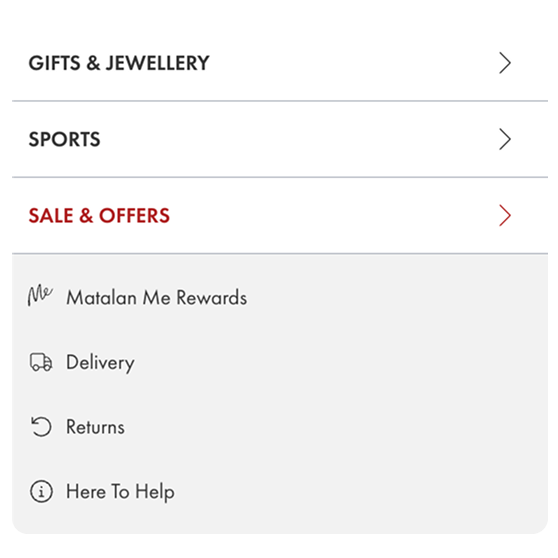
Certain navigation items can be configured to stand out from the rest of the menu, through colour, a badge, or positioning, drawing the eye to a specific category the brand wants to prioritise, such as a sale, a new arrivals section, or a seasonal collection. Because navigation carries more traffic than any single campaign page, this gives merchandising teams a lever to redirect attention across the whole site, not just on the homepage. Which items are highlighted, and how, is a configured setting supplied to the product team with the specific values needed (which item, which treatment, for how long), rather than a fully open self-serve control, reflecting that navigation changes need to stay consistent and considered.
The problem it solves
Why it matters
For the brand
A flat navigation menu treats every category as equally important, but merchandising priorities shift constantly, a sale needs urgency, a new launch needs discoverability, and neither gets it if it looks exactly like every other menu item. Without a way to draw attention within the navigation itself, the brand has to rely entirely on homepage banners, which not every shopper sees or scrolls to.
For their customers
Shoppers scanning a menu quickly move past anything that doesn't visually signal relevance. A sale or new arrivals section buried among a dozen equally weighted category names is easy to miss entirely, even for a shopper who would have been interested.
For shoppers
How it benefits shoppers
- Time-sensitive offers and new arrivals are easy to spot at a glance, rather than hidden among a long list of equally weighted categories.
- Faster discovery of what's currently most relevant, sale, new-in, seasonal, without needing to read every menu label carefully.
- A clearer sense of what the brand wants to draw attention to right now, which often matches what the shopper is actually looking for.
- Consistent visual cues across every page, since the highlighted item shows the same way wherever the menu appears.
For the brand
How it benefits the brand
Directs traffic to priority categories from every page, not just the homepage
Click-through rate on highlighted navigation items
Supports time-sensitive campaigns (sale, launch) with sitewide visibility
Campaign category traffic and conversion
No homepage rebuild required to shift merchandising focus
Time to reprioritise navigation for a campaign
Reinforces urgency for sale periods through persistent visual emphasis
Sale category conversion rate
In practice
What it looks like
- 1
The brand's merchandising team decides to highlight the 'Sale' item in the navigation ahead of a seasonal event, and supplies the details to the product team.
- 2
The product team applies the configured change, giving the 'Sale' item a distinct colour treatment in the menu.
- 3
A shopper browsing any page on the site sees the highlighted item in the navigation and clicks straight through.
- 4
After the sale period ends, the brand requests the highlight be moved to the 'New In' category for the next push.
Where it lands hardest
Strong use cases by industry vertical
Health & nutrition
Useful for highlighting new product launches or seasonal ranges (immunity season, new year), where timing-driven demand benefits from extra visibility.
Beauty & personal care
Beauty's constant cadence of launches and gift-with-purchase events benefits from a navigation-level way to draw attention beyond the homepage.
Food, drink & FMCG
Useful for seasonal or gifting ranges; less critical for everyday staple categories where the navigation structure itself is usually stable and function-led.
Pet care
Helpful for seasonal ranges (winter coats, summer cooling) but less needed for staple food and repeat-purchase categories.
Fashion & apparel
Sale, new-in and seasonal drops are core merchandising levers in fashion, and highlighting them in navigation is standard practice.
Luxury & premium
Highlighting should be used sparingly and tastefully (e.g. a discreet 'New' marker) since heavy, sale-style emphasis can sit awkwardly with a premium tone.
Common questions & objections
What clients usually ask
Why the platform version wins
Where many platforms only let a brand promote priority categories through homepage banners, highlighted navigation applies that emphasis everywhere the menu appears, which is every single page on the site.