Experience & Engagement
Header quick links
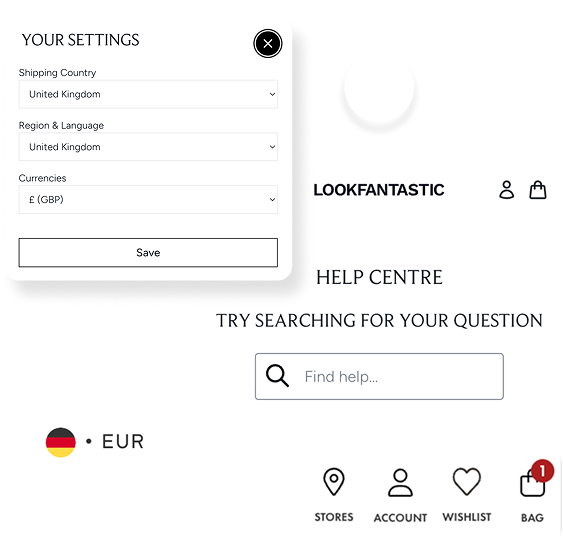
Currency/locale selector, store locator, contact/help
In one sentence
What it is
Configurable quick links in the header, currency and locale selector, store locator, contact or help. Putting the small but high-friction utility tasks one click away from anywhere on the site.
How it works
What it does
Header quick links surface a small set of utility actions directly in the header, rather than requiring the shopper to hunt through the footer or a help centre. Typical links include a currency or locale switcher, a store locator for brands with physical presence, and contact or help access. Which links appear, and in what order, is a per-brand toggle configured by the product team; it isn't a full self-serve content module, since it touches core header behaviour, but the set of links can be tailored to what actually matters for a given brand's shopper base rather than being a fixed, one-size-fits-all set.
The problem it solves
Why it matters
For the brand
International and multi-format brands accumulate utility needs. Currency switching, store finding, help access, that don't fit naturally into a product-focused navigation menu. Left in the footer, these features go unused simply because shoppers don't scroll far enough to find them, undermining the value of building them at all.
For their customers
A shopper unsure whether they're seeing the right currency, or wanting to check if there's a nearby store, doesn't want to search the site to find that answer. If the option isn't obviously available, many will assume it doesn't exist and either guess or abandon the session.
For shoppers
How it benefits shoppers
- Currency and locale can be checked or changed immediately, without hunting through the footer.
- Store locator access is visible from anywhere on the site for shoppers who want to check stock or visit in person.
- Help and contact options are always in reach, reducing frustration when a quick question comes up mid-browse.
- A more confident sense of being on the right version of the site for their market from the moment they land.
For the brand
How it benefits the brand
Higher usage of currency/locale switching reduces cross-border confusion
Session-level currency/locale switch rate
Store locator visibility supports omnichannel journeys
Store locator engagement
Easier access to help reduces avoidable support contacts
Support contact volume for basic queries
Header configuration tailored to what matters per brand and market
Utility feature usage vs footer-only baseline
In practice
What it looks like
- 1
The product team configures the header quick links for a brand trading in multiple currencies with a physical store network.
- 2
A shopper from a different market lands on the site and notices the currency selector immediately visible in the header.
- 3
They switch to their local currency in one click, without needing to scroll to the footer.
- 4
Later in the session they use the same header area to find their nearest store via the locator link.
Where it lands hardest
Strong use cases by industry vertical
Health & nutrition
Currency switching is valuable for brands trading cross-border; store locator is less relevant unless the brand has a retail or pharmacy presence.
Beauty & personal care
Strong fit for brands with physical retail alongside ecommerce, where the store locator link bridges online browsing and in-store visits.
Food, drink & FMCG
Currency and locale switching matters most for internationally traded brands; store locator relevant mainly for brands with retail listings or physical outlets.
Pet care
Most valuable for brands trading in multiple currencies or with a retail footprint; less critical for pure-play online pet brands.
Fashion & apparel
Fashion brands frequently combine international ecommerce with physical stores, making both currency switching and store locator genuinely useful.
Luxury & premium
Luxury shoppers expect frictionless access to the right market experience and, where relevant, a route to a physical boutique.
Common questions & objections
What clients usually ask
Why the platform version wins
Rather than utility features living in a footer where usage data is consistently poor across the industry, header quick links put the small number of tasks that genuinely need to be frictionless where shoppers will actually find them.