Checkout & Payments
Basket messaging & savings
Promo messages in flyout; total-savings summary
In one sentence
What it is
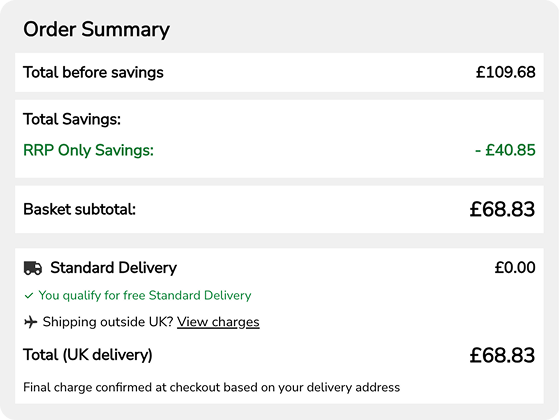
Basket messaging and savings show promotional messages in the basket flyout and a running total of how much a shopper has saved, so the value of every discount, code and offer is visible rather than buried in the total.
How it works
What it does
As items are added to the basket, contextual promo messages appear in the flyout — a threshold offer approaching, a code that's available, a bundle in progress — alongside a savings summary that totals every discount currently applied. It draws on the same offers and pricing engine as the rest of checkout, so the messages and totals shown are always live and accurate, never a marketing estimate that diverges from what's actually charged. The brand configures which messages appear and in what priority order through the same content and offers tooling used for other promotions.
The problem it solves
Why it matters
For the brand
A shopper who doesn't notice they're close to a threshold offer, or doesn't realise how much a promotion has already saved them, is less likely to add the extra item that completes the threshold and less likely to feel the value of the promotions the brand is funding.
For their customers
Discounts that apply invisibly in the final total leave a shopper unsure whether a code worked, whether they're getting the deal they were promised, or how close they are to the next saving — all before they've committed to pay.
For shoppers
How it benefits shoppers
- See exactly how much they've saved before reaching checkout, not just a final discounted total.
- Get a clear nudge when they're close to unlocking a threshold offer.
- Confirm a code has actually applied, rather than guessing from the total.
- Make an informed choice about adding one more item to hit a saving.
For the brand
How it benefits the brand
Surfaces threshold offers at the moment they're most likely to convert an extra item
Average order value, threshold conversion rate
Makes promotional spend visibly felt, reinforcing perceived value
Promotion satisfaction, repeat purchase rate
Reduces support contacts asking whether a code applied
Contacts per order during promotions
Messaging is configured through existing content tooling, not a bespoke build per campaign
Time to launch new basket messaging
In practice
What it looks like
- 1
A shopper adds two items and the flyout shows a message that they're £8 away from free delivery.
- 2
They add a third item, crossing the threshold, and the message updates to confirm it's unlocked.
- 3
A savings summary line shows the total amount saved across all applied discounts.
- 4
They go to checkout with a clear, itemised sense of the deal they're getting.
Where it lands hardest
Strong use cases by industry vertical
Health & nutrition
Effective for nudging toward multi-month supply thresholds and stacking offers on regimen bundles.
Beauty & personal care
Works well alongside frequent gift-with-purchase and sample thresholds, which are common in the category.
Food, drink & FMCG
Particularly effective for free-delivery thresholds on heavier or bulkier baskets.
Pet care
Suits nudging toward bulk-buy thresholds on heavy food orders where the saving is meaningful.
Fashion & apparel
A strong fit given the category's heavy promotional calendar and frequent threshold and markdown offers.
Luxury & premium
Use selectively — a running savings counter can undercut a premium tone; understated messaging (e.g. free delivery unlocked) fits better than an explicit savings tally.
Common questions & objections
What clients usually ask
Why the platform version wins
Because the messages and totals are generated from the live offers and pricing engine rather than a separate marketing layer, what the shopper is told in the basket is guaranteed to match what they're charged at checkout.